
Capture the Moment
Capture the Moment
Back‑Button Focus Using the Canon EOS R7
Back‑button focus (BBF) is one of the most powerful techniques you can enable on the Canon EOS R7.
Once mastered, it gives you faster control, more consistent focus, and greater flexibility—especially for wildlife, sports, and action photography, where the R7 truly shines.
What Is Back‑Button Focus?
Back‑button focus separates focusing from taking the photo.
Instead of the shutter button doing both jobs, autofocus is assigned to a button on the back of the camera—typically the AF‑ON button—while the shutter button is used only to capture the image.
This means:
Your thumb controls focus
Your index finger controls the shutter
Focus happens only when you want it
Why Back‑Button Focus Works So Well on the R7
The Canon EOS R7 features:
Advanced subject detection (people, animals, birds, vehicles)
Fast and accurate Dual Pixel CMOS AF II
High burst rates for action shooting
Back‑button focus lets you fully exploit these strengths without fighting the autofocus system.
Key Advantages
1. Instant Switching Between Focus Modes
With BBF, you no longer need to switch between One Shot and Servo AF.
Hold the back button → continuous tracking
Release the back button → focus locks
2. Prevents Accidental Refocusing
Once focus is locked, pressing the shutter will not refocus the lens. This is ideal for recomposing or shooting through obstacles like grass or branches.
3. Faster Reaction Time
For wildlife and sports, you can track a moving subject continuously and fire the shutter at the perfect moment—without delays.
Setting Up Back‑Button Focus on the Canon EOS R7
Step 1 – Open the Menu
Press the MENU button on the back of the camera.
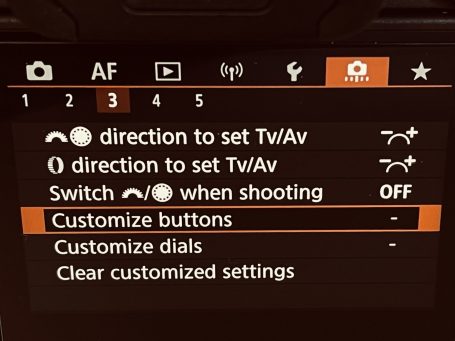
Step 2 – Navigate to Custom Functions (C.Fn)
Use the rear dial or touchscreen to move to Custom Functions (C.Fn) in the menu.
Step 3 – Select “Customize Buttons”
Choose Customize buttons and press SET.
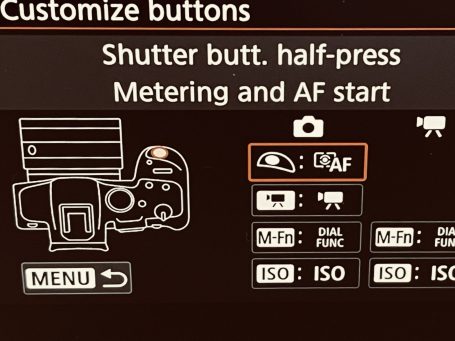
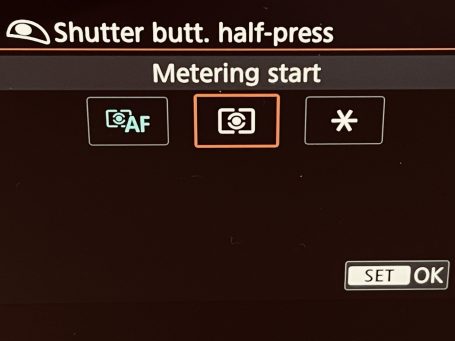
Step 4 – Change Shutter Button Function
Select Shutter button (Half‑press) and set it to:
→ Metering only
This disables autofocus from the shutter button.
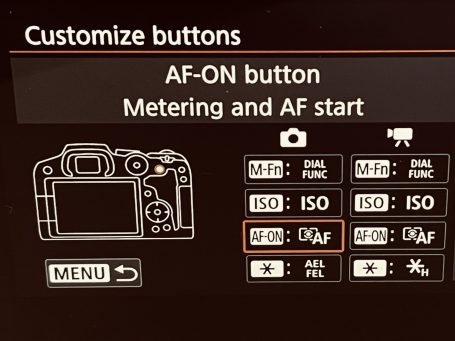
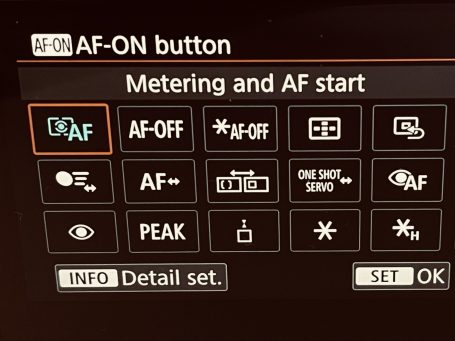
Step 5 – Assign AF‑ON Button
Select the AF‑ON button and set it to:
→ Metering + AF start
This makes the rear button your primary focus control.
Step 6 – Confirm and Exit
Press SET, then exit the menu.
Back‑button focus is now active.
Practical Shooting Examples with the R7
Wildlife Photography
Using Animal or Bird Detection with BBF allows you to:
Track birds in flight smoothly
Release focus instantly when branches interfere
Re‑engage focus without changing camera settings
Sports Photography
BBF is ideal for football, motorsport, or cycling:
Continuous Servo AF while tracking action
No unwanted refocus when firing bursts
Precise control under pressure
Portraits and Landscapes
For static subjects:
Focus once with the back button
Recompose freely
Take multiple shots without refocusing
When BBF Might Not Be Ideal
Back‑button focus does involve a learning curve:
It can feel awkward at first
Beginners may prefer traditional shutter focus initially
That said, most photographers adapt within a few shooting sessions—and rarely go back.
Tips for Mastering BBF on the R7
Practice on stationary subjects first
Use Servo AF as your default mode
Combine BBF with Subject Detection AF
Disable shutter button AF completely to avoid confusion
Give it time—muscle memory matters
Conclusion
Back‑button focus transforms how you use the Canon EOS R7. By separating focus from capture, you gain accuracy, speed, and confidence—especially in fast‑moving or unpredictable situations.
If you shoot wildlife, sports, or action, BBF is not just a technique—it is an upgrade to how you think about focus.
Once learned, it becomes second nature—and one of the most valuable skills any R7 photographer can have.
We need your consent to load the translations
We use a third-party service to translate the website content that may collect data about your activity. Please review the details in the privacy policy and accept the service to view the translations.